I prefer Firefox as my default web browser. For website development, Firefox with Firebug
is a killer combination. But when I test a page in Internet Explorer, I sometimes get cryptic Javascript errors that are impossible to track down. It turns out that Internet Explorer needs some coaxing to play nice with Visual Studio.
Enable Javascript Debugging
Open Internet Options and head over to the Advanced tab. Uncheck Disable script debugging (Internet Explorer).
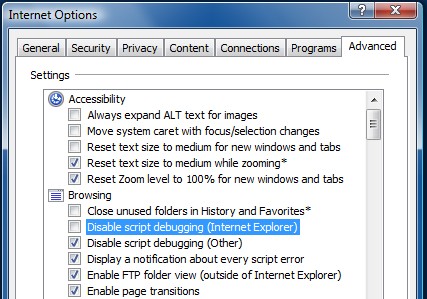
That’s all it takes; the next time you encounter a Javascript error, you will be prompted to debug. Select an instance of Visual Studio and you’ll have interactive debugging.
Launch with Internet Explorer
When you run or debug a website, Visual Studio uses you default system browser. But maybe you prefer to debug in a different browser. To change this setting, right-click on an aspx file in Solution Explorer and select Browse With. Select the desired browser and set it as default.
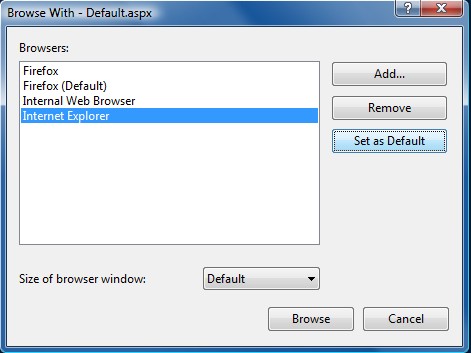
That’s it! Do you have any tips or tools for website debugging?