GMinder - Desktop Reminder for Google Calendar

Update: GMinder is now hosted on Google Code and maintained by Mike. Go there to download the most recent version.

GMinder is a reminder program that waits in your system tray and alerts you when you have an upcoming Google Calendar event. GMinder supports multiple calendars and allows you to configure how you want to be alerted. Since it downloads your events, it works offline and enables you to preview your agenda of events. New events can be added to your Google Calendars using a Quick Add feature.

Download the current version from Google Code

Current version 1.2.10 released July 4, 2009

Download and Install GMinder: GMinder.msi
GMinder is free and open source. See below for more download options.
GMinder requires Microsoft .NET 2.0

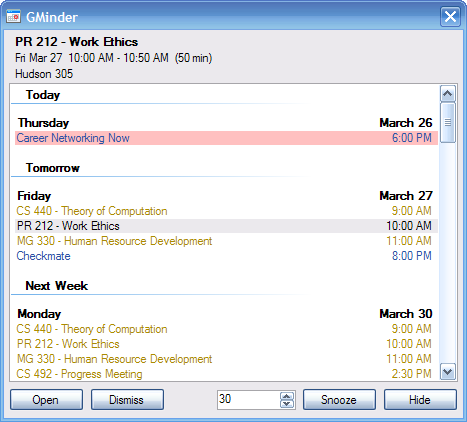
Reminder Window
GMinder Reminder.png
  • Double-click the tray icon to see the reminder window.
  • Click on an event to see its details and press the delete key to remove it.
  • New - Create a new event
  • Open - Opens the selected event in your browser
  • Dismiss - Remove the selected event from GMinder
  • Snooze - Hide the reminder window for the duration of the snooze
  • Hide - Hide the reminder window. GMinder will continue to run in the background.
  • To close GMinder, right-click the tray icon and select Exit


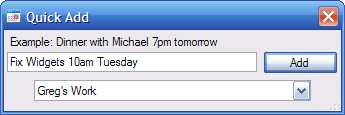
Quick Add
GMinder Add.png
  • Right-click on the tray icon and select Add Event to add an event directly to your Google Calendar.


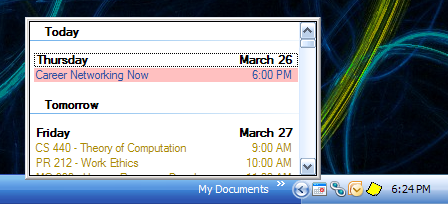
Agenda Preview
GMinder Preview.png
  • Left-click the tray icon to display a preview of your upcoming events
  • Right-click the tray icon to
    • Calendars - Add, remove, and select calendars
    • Options - Adjust settings such as refresh rate, sounds, highlight colors, and alerts
    • Clear Events - Clear all events from GMinder
    • Refresh Events - Update GMinder with the most recent events from Google Calendar
    • Add Event - Add a new event to your calendar
    • Exit - Close GMinder


Calendars
GMinder Calendars.png
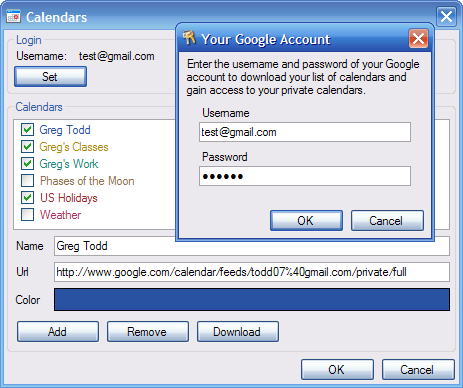
  • Press Set to enter your Google username and password. (Note that your username and password are sent only to Google for the purpose of downloading your calendars and events. Your password is stored only on your computer in an encrypted format that is unreadable to any other users.)
  • Select the checkboxes next to the calendars you want to use in GMinder.
  • You can click on the color at the bottom to adjust the selected calendar's color.
  • Add - Manually add a calendar to GMinder. You will have to enter the calendar's name and url
  • Remove - Completely remove the selected calendar from GMinder
  • Download - Downloads your list of calendars from Google Calendar


Options
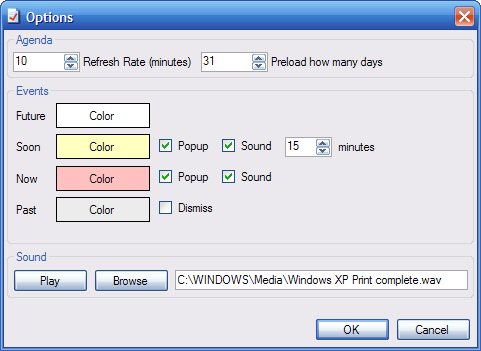
GMinder Options.png
  • Refresh rate - How often GMinder will check online for changes to your calendars
  • Preload - How many days into the future GMinder will download events for
  • Test connectivity before downloading events - If events will not download even if your calendars can be downloaded, then disable this option because ECHO is probably disabled on your network (possibly blocked by your admin).
  • Always on top - Force the Reminder window to always display on top of all other windows
  • Future - Set the background color for events that are in the future
  • Soon - Events that are soon are about to start
    • Popup - Show the reminder window when an event will start soon
    • Sound - Play a sound when an event will start soon
    • Minutes - How many minutes before an events start you want to be alerted
  • Now - Events that are currently in progress
    • Popup - Show the reminder window when an event starts
    • Sound - Play a sound when an event starts
  • Past - Events that have ended
    • Dismiss - Automatically dismiss (remove) events after they end
  • Sound - Change the sound that plays during an alert

Download the current version from Google Code

Download and Install GMinder: GMinder.msi
Tip: For faster GMinder startup time, run ngen.bat (found in the installation directory).


Also available
Program without installer:
GMinder-exe.zip
Source Code:
GMinder-source.zip (BSD license)
Alert audio file: GMinder-audio.zip

141 Comments

First off, I love the app. Thanks for sharing.

I'm wondering though, is there any way to make the pop-up stay in the location that I move it to? I ask because I prefer to have my task bar at the top of my screen, and and this causes the pop-up to be off the screen. I tried resizing it so that it would be visible below the task bar, but then when I click on the icon again it reverts to the original position.

Is there a way to edit so that when your taskbar is set to the top of the screen the GMinder popup box can open downwards so it is not cut-off?

@Jason I had not thought of use cases where the taskbar was at the top of the screen, thank you for pointing that out! I will correct the issue as soon as I can.

I'm torn between having the pop-up remember it's position, and automatically detecting if it's near the top of the screen or the bottom. I'm leaning towards the latter since the tray icon may not always be in the same place.

Tiny bug report. By default sound is set to %WINDIR%\Media\Windows XP Print complete.wav which is present in XP, but there is no such sound in vista, 7 etc You can pack app with good reminder sound from dozens of free sound libraries over internet.
P.S. This is app, I always wanted, but I'm too lazy to code it. So, big thanks for it.
P.P.S. Baaaaaaaad english...

I cannot get this to download my calendars at all. I enter the correct username (my email address) and password, but when I click the Download button the following error message:

Error downloading calendars
Did you enter your username and password correctly?
Are you connected to the internet?

Exception:
Execution of request failed: http://www.google.com/calendar/feeds/default/allcalendars/full

There are no firewalls blocking anything, and nothing else I can think of to keep this from working. Any suggestions?

@Jason I just made the fix and released version 1.1.5. The preview should properly display for users with the taskbar at the top of their screen. Please try installing this new version.

Any chance you could update this to work with Google Apps based calendars? and to allow adding new events to calendars?

Don't forget those of us with the taskbar on the side of the screen while you're at it. Sometimes it shows under the taskbar on the left side of my screen.

Thanks, this is great even with that tiny hitch.

Excellent. Thank you for the rapid response. The change works perfectly.

Looks like the app I've always wanted, but it doesn't work with Google Apps. :( I'll definitely be using this if you add in that functionality! Looks great though, thanks for sharing!

This program is excellent! I really want to use it, but I can't find any options for proxies. Is it possible to use this with a proxy server?

Thanks!

Scratch my last comment, it DOES work with Google Apps. I'm just stupid and didn't click "Download" after setting my username and password. Thanks Greg for the email explaining that it worked!

Found you via Lifehacker. Been dying for this. Thanks.

Found you through Lifehacker, as well. Thanks for doing this! I've been looking around for a desktop application like this. Major props!

ZOMG! this is so awesome i'm going to force everyone at work to use it.

Greg - Looks like you are going to stay busy. If only they had the original version you sent me many moons ago! It sure has come a LONG way and will be installing it this evening. I just have to update my calendar :-)

Thanks. I was just started looking for application like this for home use :-).

Excellent! Just what I need to quickly see what's ahead over the next few days.

There's one more bit of functionality that would make this perfect - A way to "Quick Add" events based on the text in the clipboard, then show the new event in the default browser for editing. So if "15 April go visit Nan" was in the clipboard, a new event in the calendar would be created based on this.

Thanks for making this free!

I also cannot get it working through my office proxy. Is there a way to edit the proxy settings for this application?

@Ig I'm working on proxy support right now. It's difficult to test, as I don't use a proxy myself.

Hello,

I downloaded the source and added the ability to add events to Gcal from the program. You can find the patch at: http://rowdypixel.com/tmp/quickentry.patch

If you shoot an email to dan[at]rowdypixel.com, I'd be happy to send you the full source as well.

Keep up the good work,
Dan

Thanks for this -- our company uses Google Apps (several thousand employees) and this would fill a much-needed gap over our previous MS Outlook. But we need it to work with a proxy server (at least I assume that is why it is always blank when I try it even though it will find my calendar list).

Whatever I do, even manually adding the calendars, I get "unexpected result 407" like the person above. I have a direct connection to the internet and my details ARE correct. Any ideas?

This is great, I have been too lazy to code this up but have desired it for years.

Thanks for this app, very cool.

One idea for the people having trouble authenticating - are you using the full email address (foo@gmail.com) or just the username (foo)? I put in just the username and it worked like a charm.

Thanks for the suggestion Dave but I have been trying with the full address. It really has me baffled, as it doesn't even seem to attempt to contact the google server, it immediately says something is wrong.

I would like to suggest that you include an option that makes the window upon popping up because something is due "always on top" until the hidden button is clicked or the event is dismissed. I frequently don't notice it because it immediately ends up hidden behind other windows.

@Kc
Error 407 indicates that proxy authentication is required.
http://www.checkupdown.com/status/E407.html

Please note that proxies are NOT supported at this time. It's something that I'm working on.

Hm, odd. Thanks for the reply Gregg.

I'll try again from another connection.

Found you via LifeHacker...

Fantastic app, now I don't have to keep my browser open all the time.

One feature request: could you add the ability for multiple accounts? I've got a regular gmail account and a company apps account and I'd love to be able to look at both calendars together.

@Adam:

This is kind of a hack, but you can always put the calendars from one of your accounts into the other account (through the private iCal link), then simply use that one account with GMinder.

is there an option for adding a new event?

Support for proxy authentication would be a nice feature.

In windows XP, NL (Dutch) there's no such sound file, of course, because iut has a Dutch name: Windows XP Afdrukken voltooid.wav

Silly the time system is AM/PM!

@SpyBot, @Frans Nijs

If the default sound file "Windows XP Print complete.wav" doesn't exist on your system, it's not really a problem. It is very simple to change the sound file to whatever you want.

Hey Greg,

Completely essential application you've made here. It will be a great help. The only things is...IT WON'T INSTALL. :(

I download the .msi file (525 kb) onto my hard drive and try to run the installer. The installer loads and I choose the file directory. Just when the program is about to actually install the program, an error message comes up. This is what it says:

"Error reading from G:\Gminder.msi. Verify that the file exists and that you can access it."

I'm pretty good with computers but I can't figure this one out! The msi file is on the drive and I can obviously access it. I've tried downloading the msi to a different drive and installing it to a different drive but none of this makes a difference. Help plz?

Thanks,

Kevin

(For the record, I'm running Windows XP Home.)

Well, that's odd. I downloaded the file to my hard drive (instead of my external hard drive, as I'd been doing before) and it worked fine. Odd, because most installers I run from my external hard drive work just fine. Anyway, my problem has been resolved. But you might want to check to see if it's a bigger issue.

Thanks anyway!

-Kevin

Great app.
I'd really like to have support for proxy settings, http and socks proxy to be more specific because I'm behind a proxy at work.
It's built in in the connection class if you used the 'right' one, if not it shouldn't be hard to switch to that class.

awesome application. But I have trouble recovering the schedule list back once clicking "reset" from the task tray icon. They won't come back whatever I did (restarting the app, removing and reinstalling the app, so on) since I clicked the "reset" once. how to fix this?

@tomo
Right-click on the tray icon and select "Refresh" to reload your events.

Thanks for quick response. Actually I have a DELL desktop and a panasonic laptop (Thoughbook) on both of which WinXP SP3 (Japanese) are running with .NET Framework 2.0 SP1. Basically both machines showed the same (schedules won't recover) before, but "Refresh" worked for GMinder on the laptop now, while nothing seemed to happen to that on the desktop. So I started thinking that something might be wrong with this desktop machine, not with GMinder. Thanks again.

Love it -- thanks! It a 28 - 37 mb footprint on my system, though. Does that sound about right?

@Ozy
Please note that the .NET run-time allocates extra memory to GMinder so that it is quickly available as it is needed. However, if another process on your computer needs memory, GMinder's extra memory is dynamically reduced. For example, I have GMinder running on my system at more than 20MB, but when I start a Virtual PC, GMinder's memory footprint drops to 612 KB.

So GMinder looks like a beast at first glance, but it is actually very lightweight.

I am also having issues and not sure if they are related to what other people are having. I am able to set my user name and password and have all of my calendars show up. I select the calendar and click Download. However, none of my events are actually showing up in GMinder. Any suggestions?

I released a new version (1.2.7) of GMinder today, with the following improvements:
* Ability to add events to your calendars (Thanks to Dan for getting this started!)
* Improved Google authentication
* Automatic proxy configuration
* "Always on Top" option for the reminder window

I recommend installing this new version, especially if a previous version had given you any trouble.

Thank you for all your suggestions and feedback!

The new version with the automatic proxy settings works great through our http proxy.
Out of curiosity, are you using the CLIENT login feature of the google api so that you receive a logintoken? If you do, will that token time out after a certain amount of time so that I need to login again?

@jobbs
I am using the client login feature, but the token is used only until you quit GMinder. GMinder saves your credentials (encrypted) and authenticates again when it is restarted. You shouldn't need to login again.

Sounds great.
Just add a 'start gminder when windows starts' and I'll give you the weekend off ;-)
Thanks again for a great and convenient app.

@Andrea
The exactly same phenomena are happening to GMinder on my desktop PC, it works fine on my laptop as I posted above, though.

Both machines have Win XP SP3 run on and are hooked up to the same network. Only difference between them (I noticed) are that the newer .NET Framework (v3.5) was installed with v2.0 SP1 on the desktop, while only v2.0 has been installed to my laptop so far. No idea if this could affect this.

@tomo
I don't think the .net is the issue for me--I have 1.1 and 2.0 on my computer--I have add 2.0 SP1, 3.0, and 3.5 on my computer in the past, but those versions are removed at the moment.

With the new version, I'm able to add events, and those events are showing up in my google calendar just fine. the new events that I create via GMinder are also showing up in GMinder. I just can't seem to get my info from google calendars to download.

If Greg or anyone has any ideas, please let me know. I really want to use this app because I need to have the reminders show up similar to what I use to have in Outlook. This will be a life-saver for me!

thanks!!

GMinder trys to ping www.google.com prior to downloading events. If events will not download even if your calendars can be downloaded, ECHO is probably disabled on your network (possibly blocked by your admin). To skip the ping, download's the new version released today, go into Options and uncheck "Test connectivity before downloading events".

@Greg
Thanks so much! Finally it works on my desktop pc as well, by turning off the connectivity test. I appreciate your kind help and this fantastic app!

This version fixes things -- very happy. Thanks very much for contributing this it is great.

Does this sync with iPhone?

Thank you very much for this. In order for Google calendar to be useful, there has to be automatic pop up reminders regardless of whether Calender is open within a browser or not. SMS is bit of an overkill for day-to-day reminders.

First of all thank you for this tool.

I use it like this:

set up a calendar to repeat daily forever
name of the event: what did you do in the last half an hour?

a quick php application on my localhost to allow me to answer this question with the answer stored in a mysql DB.

I get the popup every 30 minutes and press snooze to get it again.

The records are drawn into an excell file daily.

this is how you can have a record of your activity at the office with aprox 10 to 15 minutes alocated to this (1 to 2 minutes each time)

Hope this helps someone to better use his/hers time.

Hi, how can I adjust time zone in GMinder, 'cause when I create new event with my current time zone(GMT+07:00 - Hanoi), it's not appear exactly time and date, it's always later then. But in http://google.com/calendar ,I already set time zone as (GMT+07:00 - Hanoi).pls help. Many tks

Can you please add 12/24 hour switch? I am from Russia and here is 24 hour notation - so events looks ugly when 12:00 run before 8:00 at same day :)

Great app. Thanks for making it available. Perhaps it is just me, but auto-dismissing of past events does not seem to work for all day events ? Timed events are removed correctly from the GMinder view.

Greg, this is just fantastic!

Simple, no-nonsense, and just works!
What would greatly help is some strong keyboard support:
- global hotkeys to fire-up add-event, and show the agenda
- ESC to minimize the app.

Thanks,
Yanay.

Hi Greg,

It's Thursday today, and GMinder is telling me that Sunday is next week. I'm not religious, so Monday is the start of my week. Is this possible to change? If not, I'd like to request it in your next update, if possible. :)

Thanks for a great app.

Chris

Hi:
thanks for this tool! It's helpful. Is there a way to add the e-mail reminder piece as well. Right now, Google calendars doesn't send e-mail reminders [which I find especially helpful] unless set reminder time to "0 minutues" [those events with any length of time to them for some reason will not send e-mail reminders]

thanks!

@Marshall Glickman

Email notifications are outside of the scope of this program.

Hi,

thanks for this great tool. I have been using it for some days now and love it. And of course I would like to add a feature request :-)

When the reminder pops up, it is immediately reacting to key presses. When I am at that moment e.g. typing away at an email, I often have some fraction of a second or so when the GMinder window is already shown but I am still typing my email text. This typing however then goes to the GMinder window, and often the typing then immediately closes GMinder again because the keys activate some button, e.g. typing a space activates the snooze button if I have used that button before. I would be great if either the focus is not set to a button initially, no matter if I pressed that button before or not, but to the event list, or if GMinder would just pop to the front, but not grab the focus from the current window.

Thanks,
Timo

Would be nice to have support for 24h time format for European Users. :-) Somehow even the AM/PM info is missing in my agenda. Only 8:00 when its 20:00 or 8:00PM.

I have been having some difficulty with the time-zone. My Google Calendar is set with double time-zone, while my laptop toggles between one time-zone and the next.

What happens is that the events added from Google Calendar is added to the correct time, but when I use Gminder's quick add, the time-zone is invariably shifted to the other one (ie my laptop was on EST when I installed GMinder, subsequently, every addition via Gminder is assumed to be EST, but reflected on my schedule as Pacific time.)

Is there a solution for this?

I can not get my calendar to syn up with gminder. The password and everything is correct. I have hit the download button and it acts like it is downloading something for a half a second adn nothing comes up. I have removed and reloaded. Any ideas?

Please add gmail support! (notifications from inbox and labels)

This is great!! Is there anyway for it to only show events in the future? It is showing me everything that already took place and not defaulting to Today.

@Rich Resnick

Manually dismiss all past events, then check the box marked "Dismiss" on the "Options" form. That setting will cause events to be automatically dismissed after they finish, leaving only future and current events.

Thanks.
This makes my life a lot easier.

This application looks great. Is there any plan in the future for support for the Google Calendar Tasks they've put in? Is a roadmap available?

I have two Gmail account that require different usernames and password. Can I add both accounts? It appears I can only enter one username and password that applies to all calendars.

Thanks,
Kevin

@Kevin
You are correct, you can only enter credentials for one account. If you want to display calendars from more than one account, I recommend sharing the calendars from one account with the other account. Then setup Gminder to use the account with all calendars.

One warning to users (great program, and I think this probably works as designed):
Once you dismiss an apointment, you never see it again in GMinder. You won't get reminders AND it won't show up in your calendar.

This caused me to almost miss an appointment because I dismissed an appointment, then rescheduled the meeting for the next day. Although Google calendar still reminded me about it, it seems to be forever gone from GMinder.

Just a warning so everyone knows how this works!

@David Hacker
That is an excellent point. Once Gminder dismisses an event, it will completely ignore it. If you need to get back an event that you dismissed, right-click on the Gminder icon in the system tray and select Clear Events. Warning: Once you do this, Gminder will delete all events from local memory - any events that occurred before today will not be reloaded. After clearing your events, use Refresh Events to reload today's and future events.

This is a GREAT and highly useful app. Thank you for building and sharing it.

Feature idea: Allow the calendar to optionally appear and/or operate as a Vista/Win7 desktop gadget.

Thanks again for your time, effort, and creativity on this problem. Google should have thought of this.

@Max Oizo, you can get that now using Meebo notifier.

http://www.meebo.com/notifier/

Think I found a bug. Apparently GMinder does not prevent multiple instances from loading. When you load more than one copy, there's file contention over an XNL config file, you get multiple icons in the systray, and only one of the systray icons will be able to access and display your Cal.

FYI ...

Thank you so much Greg for making this app. Ever since I got rid of Google Desktop I have been looking for a program that will alert me when I have a event on my google calender. I will use this program forever. Thanks so much.

Greg, this application is awesome! Perfect combination with Google to replace MS Outlook. This is the only piece that was missing from the puzzle. Now I'm free! Hey, BTW, as an improvement I would only suggest this program to have the ability to synchronize with a server, so you could have multiple workstations i.e. work, and home PCs running the same application with the same lists.

Thanks so much,
Diego

Please can you fix the support for 24h time format. Even the AM/PM info is missing in my agenda. Only 8:00 when its 20:00 or 8:00PM.

@ak, bernd, Ruud Kwast
GMinder now has improved support for localized date and time formats. Please download the newest version and see if it solves your problem.

Yo thanks aswell this is a time saver!

IMO it needs:
- A few Keyboard Shortcuts for common tasks
- The dialogs should remember where they were dragged to, I have a WUXGA monitor and it's always top left.

Otherwise, great!
Thank you!

Great software, thank you!
Anyway there is a bug in the preview windows showing (not the reminder window, the one that I open with doubleclick, that is ok).
I resized it with the height of the desktop, and after, every time I open it with a single click on the notifyicon, it is top aligned with the icon and go outside the desktop area on the bottom.

While pressing Dismiss in Reminder Window:

System.ArgumentOutOfRangeException: InvalidArgument=Valore di '-1' non valido per 'index'.
Nome parametro: index
in System.Windows.Forms.ListView.ListViewItemCollection.get_Item(Int32 index)
in ReflectiveCode.GMinder.Agenda.Remove(ListViewItem item)
in ReflectiveCode.GMinder.Agenda.Remove(Gvent gvent)
in ReflectiveCode.GMinder.Agenda.UpdateGvent(Gvent gvent, GventChanges change)
in ReflectiveCode.GMinder.Agenda.b__5(Object sender, GventEventArgs e)
in System.EventHandler`1.Invoke(Object sender, TEventArgs e)
in ReflectiveCode.GMinder.Schedule.OnGventChanged(GventEventArgs e)
in ReflectiveCode.GMinder.Schedule.NotifyChange(GventEventArgs e)
in ReflectiveCode.GMinder.Gvent.NotifyChange(GventEventArgs e)
in ReflectiveCode.GMinder.Gvent.set_Status(GventStatus value)
in ReflectiveCode.GMinder.Reminder.HandleDismissClick(Object sender, EventArgs e)
in System.Windows.Forms.Control.OnClick(EventArgs e)
in System.Windows.Forms.Button.OnClick(EventArgs e)
in System.Windows.Forms.Button.OnMouseUp(MouseEventArgs mevent)
in System.Windows.Forms.Control.WmMouseUp(Message& m, MouseButtons button, Int32 clicks)
in System.Windows.Forms.Control.WndProc(Message& m)
in System.Windows.Forms.ButtonBase.WndProc(Message& m)
in System.Windows.Forms.Button.WndProc(Message& m)
in System.Windows.Forms.Control.ControlNativeWindow.OnMessage(Message& m)
in System.Windows.Forms.Control.ControlNativeWindow.WndProc(Message& m)
in System.Windows.Forms.NativeWindow.Callback(IntPtr hWnd, Int32 msg, IntPtr wparam, IntPtr lparam)

I have been using your application for a few months now and I find it very useful. One thing that would be potentially nice is an option to align with the windows border option for the main GMinder window, which I keep open most of the time. What I mean by this is something like the Windows Gadget bar, which is aligned to one of the screen edges, except just GMinder aligned (and on top) of it. I guess an alternative would be to turn GMinder into a gadget so that you could use the Windows Gadget facility directly, but I suspect GMinder is sufficiently complex to make this hard to do.

Great software! Thanks a lot. Is there any possibility of snooze time unit options (e.g. Minutes, Hours, Days, Weeks)? I have an office full of procrastinators that need to be able to snooze for more time than minutes functionally allow. Thanks again.

Is there any way to make GMinder start minimized? I have it start up with Windows; however, I'd prefer to not have the window pop up every time at boot.

How do you add tasks from google calendar to Gminder. I have added all my calenders and it shows the events. But is there anyway it can show my tasks?

I'd like to add that I think this is the only gmail calendar notifier with a customized / customizable snooze feature! I've been looking for this for a long time since I depend on my GCal 100%, and google's in-house notifier is stuck on 5-minute reminders. With this, you can snooze reminders for X # of minutes, nice touch, perfect for my needs. Thanks.

Really, really want this to work well for me. Puzzled with two things:

1. My default browser is Opera. However, when I click on the gMinder calendar icon in the tray, it insists on opening Google Calendar in Internet Explorer. Internet Explorer hangs on my computer. How do I convince gMinder to use Opera or Chrome or Firefox instead of IE?

2. It keeps popping up daily reminders of one-time events that have passed. How do I get it to refrain from reminding me of events from past days?

Thanks,
kwc

Just found the "dismiss" instructions above and have implemented that. Hope that works.

I DO want to keep the past events on my Google Calendar, just don't want gMinder to keep reminding me of them. Am assuming that using the "dismiss" option will accomplish that.

Now.... how to get it to open Google Calendar in a browser other than IE?

@ken winston caine

GMinder will launch the link to Google Calendar using your default browser. Whatever program is set to handle http links should be the program that launches. If the expected browser is not opening, ensure that you have selected it as your default browser.

Try creating a shortcut on your desktop to a website (ex: http://google.com/). When you open the link, it should be using the same browser as GMinder.

@ken winston caine

Dismiss removes the event from GMinder, but will NEVER remove an event from Google Calendar. GMinder never makes any modifications to your Google Calendars.

Thank you, Greg.

Responses:

- I have Opera set as my default browser. And IE even notifies me that is is NOT the default browser when I open IE. But, I created a web shortcut on the desktop as you suggested and indeed it opens in IE. So somewhere I have set my computer to open web address shortcuts in IE. I'll find that and change it.

- Gminder was popping up reminders of past events upon each startup, even when I had no new events scheduled. I've manually dismissed all past events and set the option to "Dismiss" and expect that tomorrow, when I restart my computer, all will be well.

Looks like I'm going to have this running beautifully shortly.

Thanks for the quick help. It's working beautifully now. And, in retrospect I see that if I had read the documenation on this page carefully I would have discovered how to set gMinder to automatically dismiss past events.

Wonderful add-on for Google Calendar.

Has a bug. Added an event for Nov 9th 5:00pm - 7:30pm. Timezone for everything is Arizona. Event appears perfectly fine in Google Calendar, but in GMinder it shows up as 4:00pm. However, events for this month (September) show up at correct time. Doesn't seem to be parsing times correctly for future months..?

I've been using the program for 5 days. The original calendar downloaded OK, but modified events only show up on Monday, Wednesday and Friday. Tuesday's and Thursday's changes won't show.

recentley google update :
Sports calendar(http://www.google.com/calendar/render?settings=10)

but, gminder can't download that calendar. fix it please~

Is there anything like Gminder for Mac OS X. I have done some research and I couldn't find any application that generates a list of events where you can snooze and dismiss events?

@Diego

I'm not aware of any equivalent Mac application. There could be one, but I haven't looked.

Since GMinder targets .NET 2.0, you may be able to get the application running on a Mac using Mono. However please note that I have not tested GMinder with Mono. If you decide to give this a try, please let us know your findings!

http://mono-project.com/

This seems like a really useful app, but the events window is always empty, although I have pending appointments. The only way to be able to show upcoming events is if I add them using GMinder. Any ideas? Login works, and the calendars show up in the Calndera option

I previously reported that no events showed up. Then I read the documentation :) After unchecking "Test connectivity", it worked like a charm. Thanks for a great program, now I finally can get rid of Outlook :)

A very cool and userful program. I've listed it in my website.

Very good program - any possibility of an added feature? - the ability to run a file or application instead of simply a wave file - and if this worked with a filter aswell, that'd be awesome (so that it would open a new MS word template for any event titled 'meeting', for example).

Thanks

Hello,
I use wind7 and have 2 monitors.. so i prefer to have my task bar on the left side of my screens. When i click on GMinder the popup is bit off the screen.. the only thing i can do is re size, but I cant move it.

for the rest i love it, thanks. :) its good one and i think i ll use it

is there a fix for the WRONG TIME bug yet?

I'm having trouble starting GMinder for the first time. When I run ngen.bat I get a MS failure popup: '.NET Runtime Optimization Service has encountered a problem and needs to close'. When I close the popup the app window contains:

C:\Program Files\GMinder>C:\WINDOWS\Microsoft.NET\Framework\v2.0.50727\ngen.exe
install gminder.exe
Microsoft (R) CLR Native Image Generator - Version 2.0.50727.1433
Copyright (c) Microsoft Corporation. All rights reserved.
Installing assembly C:\Program Files\GMinder\gminder.exe
Failed to get dependencies for assembly. (Exception from HRESULT: 0x80131F00)

I have these .NET updates installed:

Framework 1.1
Framework 2.0 SP2
Framework 3.0 SP2
Fraemwork 3.5 SP1

Any suggestions?

Thanks.

Bruce

Is or will there be an option to pin this application to the windows 7 taskbar (as opposed to the systray area), displaying calendar appointments in standard jumplist layout?

@Dennis
I think that would be awesome, but I have no plans to implement that feature at this time.

I may be mistaken but it looks like Gminder pops up reminders based on the Gminder Options panel. Is there some way that Gminder could pop the reminder based on what I have set in Google Calendar? Thanks.

Hello,

I cannot get this to download my calendars at all. I enter the correct username (my email address) and password, but when I click the Download button the following error message:

Error downloading calendars
Did you enter your username and password correctly?
Are you connected to the internet?

Exception:
Execution of request failed: http://www.google.com/calendar/feeds/default/allcalendars/full

Any suggestions?

Any sound file that I enter for the reminder doesn't work. I get any error that says the Sound API only accepts PCM wave files. I'm using Windows 7.

To DNA,

Check out your "username"... it's not the same as your "e-mail adress"... the username don't have the "@gmail.com" part...

Great application Greg! Although I'm having some trouble with wrong time for some appointments...

Thank you!

Diego

I would like to suggest a third "state" for events.
It would be something like "Done". Right now, only events with a beginning and end time seem to acquire the "Past" background color. However, if you add an event like "call Tom @ 2pm" (without an end time), that event will stay in the "now" color from 2pm until the event is either dismissed or deleted (in both cases the event will not be in the list anymore).
The "Done" feature would work in a similar way as the "Future" event in the sense that it would only have a color choice (no pop-up or sound)
This way the user can keep the events in the calendar (maybe to keep track of what has been done during the day), but would not have the event highlighted in the "now" color for the rest of the day or until the event is removed/deleted or the end time is reached.
This whole feature would allow the user to use this calendar as a "To Do" list as well, where he can keep track of what has been done ("Done" feature), what has to be done "soon", "now" or in the "future" (these last three are features that already exist in this app). Of course, users who do not want to keep track of events that have been done, could continue to use this app just a calendar and use the "remove" option to get rid of events if needed.

Thanks for this awesome app!

I've been looking for a non-clunky reminder system for GCal, and this is the best program I've found so far.


One question, is it possible to start GMinder minimized so it doesn't show agenda on startup?

Love the program but I have a question/request. I use a toolbar (ObjectDock) on my systems (XP & Win7) and have GMinder set to open when the toolbar's calendar icon is clicked. However, it always opens a new GMinder instance when clicked. Would it be possible to add an option that, when checked, would have GMinder "hand off" to the existing instance and re-open the existing instance's window if it is already running when it starts up?

Thanks for building this app!

My company (Redfin) moved our email/calendar/etc. from Exchange to Google Apps recently. The Outlook sync has been flaky, so I've been using the web UI exclusively. One of the things I've been missing is an in-my-face notifier to make sure I don't miss meetings. GMinder fills that gap perfectly.

I'm using win7 64-bit, and like a few other people above, I ran into the problem where the default sound file was not found. I tried to grab a random sound file from the internet, but GMinder rejected it because it wasn't PCM-encoded. I ended up using a freeware utility (audacity) to convert my downloaded WAV file to PCM-format, and now it works. By the way, GMinder still notified me even the file wasn't available or was malformatted; it's just the notification was a big error message :-)

The one issue I'm running into now is that when I open the main GMinder window (by double-clicking the tray icon), the window is empty. It's also empty when it comes up automatically for a meeting notification. I'm still getting notifications, and I can see my calendar in the little pop-up window (when I single-click the tray icon). But the main window is empty. This means that I don't have a way of snoozing, but I can still remove calendar entries. So, it's still functional and I still use it, but it seems like a bug worth fixing. Let me know if I can provide any help in analyzing the problem.

By the way, I'm running version 1.2.10.0.

Thanks again.

I installed GMinder on one of my user's machines and it ran perfectly for several months. I switched her monitor and now she gets an error "GMinder has encountered a problem and needs to close. We are sorry for the inconvenience." I uninstalled and reinstalled and get the same error. I changed the monitor back to the original model (just a long shot) and no change. Has anyone else received this same error or have a solution? My user has fallen in love with this application and now cannot live without it.

Thanks!

Thank you so much for writing this program.

I tried many Gcal-to-Desktop solutions and this one's the best overall

Is there any chance you can have the Agenda window remember its position? I leave that window open on the desktop to keep track of my week ahead. I suppose I'm using it more like a Gadget than how the rest of you use it.

I am a newbie to gmail and therefore gminder, is there a way to snooze just a particular task? Or do I just have to snooze the Gminder screen instead?

Hi
thank for Gminder, I hope you can add to the Snooze hours,days,weeks it will be very helpful
thanks again
best wishes

Feature Request: I wish I could resize the window and it would remember the last opened dimensions and position.

I noticed at one point that Gminder wasn't refreshing my events, so I pressed Clear Events and then Refresh Events. Now Gminder doesn't show any events from my calendars at all. Has anyone else had the same problem? I'm using Windows XP SP3, .NET 3.0 SP 1.

So I've installed this on a windows vista box, and it never loads in any events. It will download my calendar, but I see no events at all. No notifications pop up. No errors, not sure what's going on.

Software looks great otherwise :)

Thanks first of all for your time and effort in creating this.

My comment/suggestion/feature is a possible 'pre' reminder, like in the Options/Reminder section of Google Calendar when making an appointment/event. It would be nice to be notified x min before the appointment.

Your thoughts?

Eric

>>So I've installed this on a windows vista box, and it >>never loads in any events. It will download my >>calendar, but I see no events at all. No >>notifications pop up. No errors, not sure what's going on.

Same here on Windows 7 64bit

I can login and get my list of calendars, but then I get a blank box of events.

Great idea but there's no way I'm going to give my gmail username AND password to you. I don't know you!

I'm sure you are legit but I can't take that risk. The advantage of the gmail notifier is that it is written by Google and I trust them more than a random stranger.

Anyone who signs up to this is clearly insane.

@Mike - I certainly understand your apprehension to imputing your password into some random program. It is scary how many Internet users don't give a second thought to giving their passwords to third-parties. When someone evaluates the trustworthiness of GMinder, I hope they consider that 1) GMinder runs on your own local computer so there is no need for your password to ever been sent to to anyone besides Google and 2) since GMinder is an open source .NET program, you can inspect its behavior.

GMinder stores your password locally (in encrypted format) and sends it to Google (and Google only) for authentication purposes. I encourage you to verify the GMinder's behavior yourself. You could 1) monitor the Internet traffic generated by the program using a tool such as Wireshark or Fiddler, 2) inspect the code in the compiled program using .NET Reflector, or 3) inspect the source code and compile it yourself. You will find that there is not any malicious activity perpetrated by GMinder.

I love this program but when i booted up this morning i got this error. "GMinder has encountered a problem and needs to close. We are sorry for the inconvience".
I have used system restore twice to no avail.
Anyone have any idea how to fix this?
Thank You.

same problem as james: starting up gminder suddenly gives "GMinder has encountered a problem and needs to close. We are sorry for the inconvenience."

tried several re-installs, but still the same problem.

anyone resolved this?

Any help would be much appreciated.

Hi! Nice tool! Are there any command line switches (options) available to add/remove an event to Google Calendar with GMinder? e.g. gminder.exe -add -user -pass -event -start -end Thank a lot!

One very important thing I would love for you to add...

When adding events on Google Calendar, there are reminder options. Can you use the "[x] minutes" that are assigned there by default?

My alerts are all over the map, with respect to minutes. I don't use the exact same number of reminder minutes for every event. Some events, for instance, I like to be reminded of a day or two in advance.

If you were to use, by default, the reminder minutes on the Google Calendar event (and then if none was set, default to the setting minutes) that would be fantastic.

No way to add events to my calendars.
It says:
" Error adding event.
You may not have permission to edit the selected calendar.

Exception:
Execution of request failed: http://www.google.com/calendar/feeds/xxxxxx@gmail.com/private/full

@Ryan - I have looked into supporting Sports Calendars, but it seems that Google limits access to Sports calendars to the web-interface only. The Sports calendars are invisible to GMinder and any other program that uses Google's API. See this thread. I assume this is due to licensing restrictions.

Greg,

Nice software. Loving it. I wanted to comment on what might be a nice feature to add. What do you think about an option to select "Show today only" so when the reminder pops up you have a view into that days events only rather than the preloaded days that currently need to be scrolled through. Just a thought.

Russ

I am also getting the Error Adding Event saying "You may not have permission to edit the selected calendar"

Any ideas how to correct?