The following is a report I wrote for my Artificial Intelligence course in November 2006. It discusses Franklin Chang’s article entitled “Symbolically speaking: A connectionist model of sentence production.”
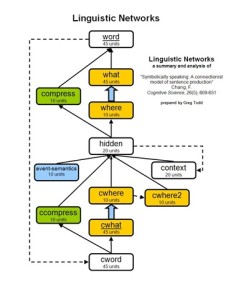 F. Chang developed neural networks to produce proper sentences from basic messages. His networks were implemented on LENS neural network software. This research was performed around the year 2000 and a paper detailing his research and findings was published as an article in Cognitive Science in 2002. In this paper, I will explain, summarize, and analyze his article.
Background
Because Chang’s models are neural networks mimicking human linguistic abilities, comprehension of his work relies on familiarity with linguistics and connectionist models. Linguistics will be addressed as necessary throughout this paper. A neural network is a computing model comprised of nodes (also called units) grouped into layers. The nodes between two layers are connected by weights. As nodes are activated, the activations of each layer are passed forward to the next layer by the connecting weights. Layers are connected in a forward-feeding fashion so that there are no loops. The value of a weight determines how much of the activation from the sending node is transferred to the receiving node. The total of all the activations received by a node determines its activation value. The result is a network of nodes that pass activations forward through the network. Activations originate from the input layers, which serve as the input for the network. These activations feed-forward to the output layers, whose activations serve as the output of the network. Learning occurs as weights are adjusted to correct the actual output values to match the desired output values.
Abstract
Chang’s article discusses and compares several connectionist models for properly constructing sentences appropriate to given messages. To achieve this goal, the models need to learn the proper vocabulary and grammar for expressing messages. Traditional approaches have relied heavily on statistics, employing simple recurrent networks (SRN). This approach theorizes that by learning the statistical regularities of a sufficiently large training set, an SRN model can generalize to correctly produce sentences for similar messages not found in the training set. However this approach generally doesn’t generalize as well as desired. While it can correctly learn the training set, the SRN model poorly applies what it has learned to novel situations. To overcome this difficulty, Chang develops the new dual-path model. The goal of the dual-path model is to utilize symbols in its processing. This model separates the actual words from the context in which they are used. This abstraction allows the dual-path model to learn how the contextual symbols of a message are arranged independently of learning the contents of the symbols.
Summary
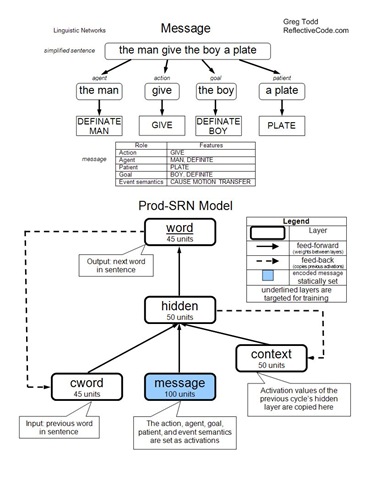
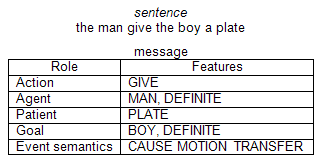 A message is an event comprised of an action (verb) and the related participants. “The participants in an event [are] classified into one of three event roles: agent, patient, goal. The agent [is] the cause of the action, the goal [is] the final location for the object, and the patient [is] the object in motion or the affected object.” (612) For example, in the simplified sentence the man give the boy a plate, the underlying message would be comprised of the action give, the agent the man, the patient a plate, and the goal the boy. These messages are abstracted from any surface sentence structure. Additional information is also included in the message, such as whether a participant is a definite participant (marked by the in a sentence), and various event semantics. Event semantics indicate features in a message. In our example, the man give the boy a plate, there is a cause (the man initiates the action), a motion (the plate is moved), and a transfer (the boy comes to possess the plate). These event semantics are important for distinguishing between possible uses of a verb.
The models are challenged with building proper sentences, something that takes years for a human to become proficient at. There are two aspects to this problem, correct lexical selection and proper sentence-level ordering. The lexical aspect involves representing each feature in the message with the correct word in the sentence i.e., choosing the correct vocabulary word to express a concept. For example, when the feature is DOG is in the message, the program must output the correct vocabulary word dog in the sentence. At the sentence-level, the words must be placed in the correct positions and order. To further illustrate our example, if the action is BARK, then the correct sentence would be a dog bark, not bark a dog. It is important that the network learns these two aspects independently of each other. Otherwise it may not be able to place words into novel positions that the network hasn’t experienced before.
Simple Recurrent Network
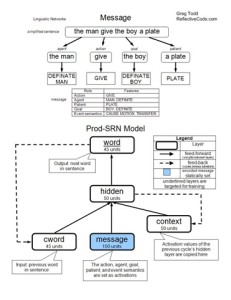 The Production Simple Recurrent Network (Prod-SRN) is the first network model employed by Chang. This model has three layers feeding the hidden layer: cword, message, and context. The hidden layer feeds an output layer: word. The model is recurrent, each cycle producing the next word of the sentence. Before the cycles begin, the message layer is activated with the features present in the message. These activations are static and do not change once initially set. Before each cycle, the cword layer is activated to represent the previous word in the sentence. Also, the previous activations of the hidden layer are copied to the context layer. This allows the context layer to serve as a memory of the previous cycle. During each cycle, activations feed-forward through the network. The resulting activations of the word layer indicate the word produced by the network. During learning, weights are modified using back-propagation to help match the actual output to the desired output. This process is repeated until the end of the sentence is produced (indicated by an end-of-sentence marker).
The results of this model are disappointing. In Chang’s research, the Prod-SRN model reaches 99% accuracy in learning the training set. However Prod-SRN performs very poorly on the test set, never topping 13% accuracy. It seems the knowledge learned by the Prod-SRN model is not of much use outside the training set. It does not learn lexical selection separately from sentence-level placement. The two are too tightly bound, hindering its ability to place words into new positions. This hindrance is due to the single mechanism used for learning both the lexical and sentence-level aspects of sentence construction. In short, Prod-SRN generalizes poorly.
Dual-Path Model
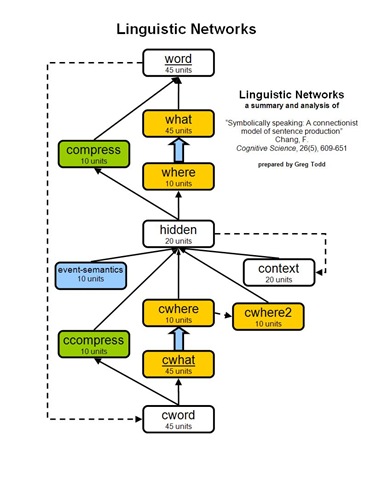
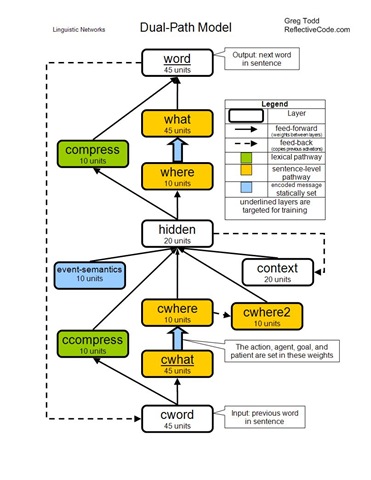
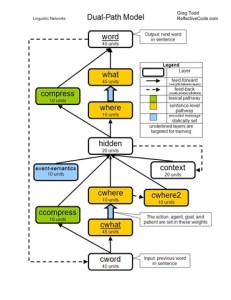 When Chang set out to design an improved model, he wanted it to be better suited to generalize in novel situations. He devised the dual-path model, with two distinct paths through the network. These two paths give the model two mechanisms with which to learn sentence construction. One pathway is the sentence-level pathway. The first half of the sentence-level pathway sequentially leads from the cword layer, to the cwhat layer, to the cwhere layer, to the hidden layer. Just as in the Prod-SRN model, the cword layer is activated with the previous word of the sentence. The cwhat layer represents the feature associated with the previous word. The cwhere feature represents the role associated with the previous word. This structure causes the activations reaching the hidden layer in the sentence-level pathway to be abstracted from the actual word, symbolically representing only the role of the current word in the message. There is one cwhat node for each possible feature and one cwhere node for each possible role. The cwhat–cwhere weights are set according to the message and are static throughout a sentence’s production. For example, if the action is GIVE then the weight between the ACTION node in the cwhere layer and the GIVE node in the cwhat layer would be set as positive. And if the agent is MAN then the weight between the AGENT node in the cwhere layer and the MAN node in the cwhat layer would be set as positive. All other unused weights between the cwhat and cwhere layers are set to zero. These bindings represent knowledge of the message in the network.
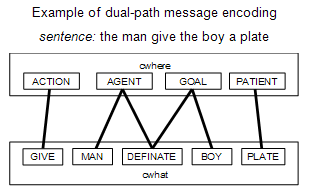 The second half of the sentence-level pathway is a reversal of the first half. The hidden layer leads to the where layer, then to the what layer, and finally to the word layer. The weights between the where and what layers are a mirror copy of the weights between the cwhere and cwhat layers. This way the hidden layer can receive role activations from the first half of the pathway, and send role activations through the second half. The activated roles are translated back into the related features by the where-what weights.
The other pathway in the dual-path model influences lexical selection. It leads from the cword layer, to the ccompress layer, to the hidden layer, to the compress layer, and finally out to the word layer. This pathway learns in a manner similar to the Prod-SRN model, except that the layers are smaller because the dual-path model does not solely rely upon this pathway as a means of sentence construction.
Three additional layers feed the hidden layer. The cwhere2 layer contains the summation of previous cwhere activation levels. This serves as a memory of roles previously activated during sentence production. The context layer is a copy of the hidden layer’s previous activations. This also serves as a memory, just as in the Prod-SRN model. Finally, the events-semantics layer encodes the event semantics of the message. There is a unit for each possible event semantic, and appropriate units are set as active during the duration of sentence production.
Test Results
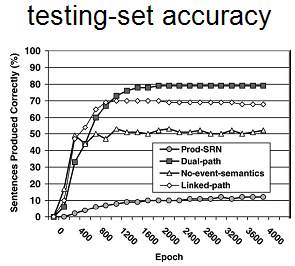 The dual-path model is also tested and compared to the Prod-SRN model. Not only does it learn the training sets just as well as the Prod-SRN model, it also correctly constructs about 80% of the sentences in the testing set. This is much better than the 13% accuracy achieved by the Prod-SRN model. The success of the dual-path model is owed to the symbolic processing achieved by separate mechanisms for lexical selection and sentence-level ordering. This allows the dual-path model to determine the placement of the words independently from selection of the words. The result is a markedly improved ability to generalize compared to the Prod-SRN model.
Two additional models are created as modifications of the dual-path model. They both differ from the dual-path model in only one way. This serves to highlight the importance of particular features in the dual-path model. The no-event-semantics model is identical to the dual-path model, except that it lacks the event-semantics layer. Without event semantics, the model losses information about how the message is to be constructed. In practice, it learns the training set as well as any other model, but produces sentences in the testing set with only 50% accuracy. This decrease in performance highlights the importance of event semantics in sentence construction.
The final model was the linked-path model. It differs from the dual-path model in that it has a link between the hidden layer and the what layer. This violates the dual-path architecture because it circumvents the symbol abstraction provided by the sentence-level path. Sometimes a network can perform better with extra layers or links between layers added for complexity. This alternate model was developed to test if the success of the dual-path model is primarily attributed to its extra complexity, or to the two separate pathways. The results show that the linked-path model learns the training set just as well as the other two models, but can only achieve 70% accuracy on the testing set. In fact after a certain point, the accuracy of the linked-path model decreases with additional training. This suggests the linked-path model starts to memorize the training set, a problem that is avoided in the dual-pathway architecture. It can be concluded that the dual-path model’s success is due to its separation of lexical and sentence-level processing.
Additional testing and analysis of the dual-path model suggests that it learns in ways similar to humans. When the system is damaged (by randomly changing weights) in particular regions that correspond to regions of the brain in impaired patents, it is found to generate errors similar to the human patients’ errors. Other testing shows that as the dual-path model learns, it over-generalizes and sequentially constrains its over-generalizations in a fashion similar to children. As the dual-path model learned, it over-generalizes the use of verbs into improper constructions because the sentence-level pathway allowed it to place verbs a number of ways. But as continues to learn, the lexical pathway begins to constrain the over-generalizations to prevent particular verbs from being used improperly. This same pattern of behavior can be observed in children. The similarity between human examples and the dual-path model is a natural result of the dual-path model being designed specifically to mimic human-like use of symbols in sentence construction.
Analysis
Chang’s work is impressive because he successfully unites several fields of study into a fully functional model. His accurate linguistics model is constructed as a compromise between two connectionist schools of thought, one statistics based, the other modularly based. Chang borrows from both, building a modular sentence-level pathway and a statistical lexical pathway. I think the most innovative feature is the representation of the message as bindings between the word and where layers. Although not discussed in the article, I imagine that the most difficult aspect of the project would have been the generation of valid messages and sentences to as training and testing sets.
Chang’s analysis of the dual-path model reveals close similarities to observed human linguistic abilities, development, and hindrances. Therefore, it helps confirm the linguistic theories that it is built upon. It raises interesting questions about what other seemingly complex human behavior can be mimicked given an insightful model. Further research could be conducted with an expanded domain, one with an increased lexicon (Chang only used 63 words) and a greater assortment of event semantics to produce a greater variety sentences. Other extensions might involve adding noun-verb agreement or verb-tenses. Additionally, the system could be reversed to extract a message from a sentence.